Getting the Most From a Skincare Routine Journal KDP Interior Without the Usual Publishing Headaches
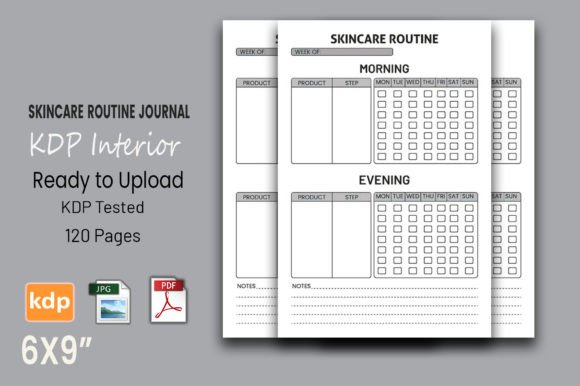
Publishing a low-content book on Amazon KDP can feel like a shortcut to passive income, and a ready-made skincare routine journal KDP interior seems like the perfect foundation. It’s already sized at the popular 6x9 inches, built with vector art you can tweak, tested on KDP, and includes 120 printable pages—all with no bleed to worry about. But while the file itself promises a quick upload, the space between a decent journal and one that actually sells well (and keeps customers happy) is filled with small, avoidable mistakes. Understanding those hidden snags transforms a generic interior into a product people genuinely want to use.
Trusting a “KDP Tested” Label Without Verifying
Many interiors come with the reassuring phrase “KDP tested,” but that doesn’t always mean the file works flawlessly inside your specific account. KDP’s print specifications can vary subtly depending on the printer location assigned to your title, and what passed a preview test for one publisher might still show misalignment in another region. The real test is the online previewer and a physical proof copy.
A creator once uploaded a beautifully designed skincare habit tracker interior, saw it pass the automated check, and sent it live. Customer reviews began mentioning that some dates at the bottom of the page were cut off, even though the interior was supposedly no-bleed. The issue? The printer’s manufacturing tolerance shifted the content slightly upward, eating into the bottom margin. To avoid this, always check the live preview after uploading—flip through every page, not just the first one. Look at the edge distances. A safe rule is to keep all text and important design elements at least 0.5 inches away from the trim line, even for no-bleed interiors. If the original file places elements too close, adjust the vector file before you order a proof. Don’t rely on assumptions.
Resizing Vector Files Without Rethinking the Layout
One of the selling points of a skincare routine journal KDP interior is that it’s vector-based and resizable. You can technically scale the whole document to another trim size, maybe 5x8 or 8.5x11, in Adobe Illustrator. The mistake happens when creators simply stretch the artboard without recalibrating writing line spacing, font sizes, or margin balance.
Imagine you scale a 6x9 interior with lined daily logs to a smaller 5x8. The handwriting lines shrink proportionally and suddenly become too cramped for comfortable use. A customer trying to jot down their evening routine might end up with overlapping letters, creating frustration. Conversely, scaling up to 8.5x11 makes the same lines look awkwardly spaced and oversized. If you must change the trim size, don’t just resize—rethink the layout. Manually adjust the leading of the lines, keep the font size for headings around 11–13pt, and test a printed sample by actually writing on it. A better approach is to stick with the proven 6x9 format unless you have a strong reason to change, or to use the vector file’s editable nature to create an entirely adapted version from scratch rather than a crude stretch.
Leaving the Interior Exactly as Downloaded
You aren’t the only one buying that skincare routine journal KDP interior. When multiple sellers upload the same unchanged file, the market quickly gets flooded with identical products. The result is a race to the bottom on price and poor differentiation. More importantly, customers notice. They’ll compare your “skincare log book” with three others that look exactly the same inside, and reviews might mention it feels copied.
Since the file is editable, use that to your advantage. Even small customizations make a huge difference. Add a personalized welcome page that mentions your brand name or a short encouragement note for the user. Insert a few guided prompt pages before the weekly logs—maybe a “skin goal setting” spread or a “product allergy tracker” not found in the default version. Change the cover-related graphic elements inside (like a small corner motif) so the interior subtly echoes your unique cover design. That alignment between what the buyer sees on the listing and what they find inside builds trust and reduces returns.
Skipping a Thorough Content Review From a Real User’s Perspective
It’s easy to get caught up in the technicalities—DPI, margins, vector crispness—and forget that this is a tool for someone trying to track their skincare. A logical layout on the screen doesn’t always translate to a useful journal in real life. A common mistake is not reflecting on whether the pages actually help someone stay consistent with their routine.
For instance, a journal interior might have a beautifully formatted daily entry with sections for “AM Routine,” “PM Routine,” and “Products Used.” That seems fine until you realize the “Products Used” box is too small to write actual names like “CeraVe Hydrating Cream-to-Foam Cleanser.” Users get frustrated, give up, and possibly leave negative feedback. Before publishing, print a few page spreads and fill them out yourself. Note where the space runs out or where the flow feels awkward. If you find a flaw, you can adjust the vector file: widen the columns, increase the note section, or add a small icon to jog memory. This hands-on check turns a generic interior into a genuinely considerate product.
Treating No-Bleed as a Magic Shield Against All Trimming Issues
“No bleed” simply means your design doesn’t extend to the edge of the page, so you don’t need extra space for trimming. But it doesn’t mean the text is exempt from the live area danger zone. KDP’s printers have an inherent margin shift of about 0.125 inches on all sides, and occasionally more in the gutter. If your journal has page numbers sitting less than 0.4 inches from the bottom, they could disappear into the binding or get clipped unevenly on alternating pages.
Open the PDF and measure the safe zone again. Even if it’s a no-bleed skincare log interior, everything users need to read or write should stay inside a comfortable live area. Move headers and footers at least 0.5 inches inward. This advice is especially critical if you modify the file by adding your own header such as “Day _ of _” near the top edge. Test a proof copy and flip through the center pages—those closest to the spine often suffer the most from tight gutter margins.
Overlooking Page Count Matching and Blank Page Risks
The interior comes with 120 pages, a solid length for a three-month skincare diary. But during customization, people often delete a page they don’t like—maybe an extra note page—and forget to adjust the total. When you upload, KDP expects exactly the number of pages you entered. A mismatch, even by one page, triggers an error. Never assume the system will simply pad or ignore the difference.
Similarly, adding extra pages without checking for unintended blank spreads can cause problems. If your PDF has a blank page at the end that you didn’t intend to keep, it’s not just wasted space; it can confuse a reviewer or produce an odd-looking final product. After any edit, run a final check: note the last page number, export the PDF with the exact page count you plan to list, and then preview the entire file in the KDP cover creator to confirm no unexpected gaps exist.
Using the Wrong Software to Edit and Damaging the Vector Quality
The selling point of “vector editable PDF” only holds true if you open it in a compatible vector editing program like Adobe Illustrator, Affinity Designer, or Inkscape. Many first-time publishers try to modify the interior using a standard PDF reader or a basic editor that treats everything as a flat image. The moment you save after a minor text change, you might rasterize the entire page, reducing the clean 300 DPI quality to a fuzzy mess.
Always check whether your editing workflow preserves the vector layers. If you only need to tweak a couple of headings, open the PDF in Illustrator, find the text layer, make changes, and save it back preserving the editable text. If you don’t own such software, consider hiring a brief design task on a freelancer platform to customize it correctly. The cost is tiny compared to negative reviews about blurry pages or illegible text.
Forgetting That a Privacy-Focused Journal Needs No Bleed Grace Space
No-bleed is perfect for a skincare journal because it keeps content safely away from edges where it might be trimmed. But this also means you can add delicate border lines or subtle corner decorations without fear of lopsided trimming. A missed opportunity here is leaving the margins completely blank and sterile. A soft, dotted border that stops half an inch before the edge adds a premium feel without risk. Or a small repeating icon—a leaf, a droplet—sitting comfortably inside the safe zone. These touches cost nothing when you have an editable vector file, yet they dramatically lift the perceived value of the finished paperback.
How to Avoid the Biggest Post-Publishing Surprise
The single most effective step you can take is ordering a printed author proof before you click publish. The online previewer is good for obvious errors, but it won’t show you how the paper weight affects line visibility, or whether the binding allows the journal to lie flat enough for left-handed writers. Order a copy, sit down with your own skincare regimen for a week, and fill out the pages. Notice whether the ink from a gel pen seeps through, if the columns for AM and PM need a clearer divider, or if the daily gratitude section (if present) truly fits. Then go back, adjust the vector file if needed, and reupload. That one real-world test often catches the subtle friction points that decide between a four-star review and a returned product.
When you treat a skincare routine journal KDP interior not as a finished answer but as a carefully considered starting point, you stop being just another low-content publisher and start building a little brand of thoughtful stationery. The PDF is ready to upload—but ready isn’t the same as remarkable. With a few mindful checks and genuine user testing, that 120-page 6x9 journal becomes something your customers will actually stick with, and that’s how you grow a sustainable publishing business on Amazon without guesswork.