Education Journal KDP Interior: Smart Publishing Choices to Launch a Journal That Sells
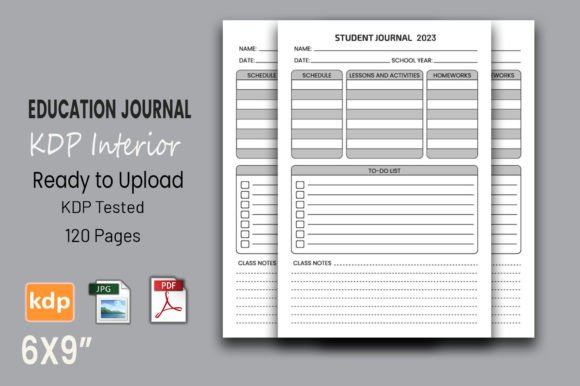
When you decide to create a notebook, log book, or diary for Amazon KDP, the interior file is the core of your product. It’s what the buyer sees page after page, and it directly determines whether they leave a positive review or request a refund. An Education Journal KDP Interior is a ready-to-upload design specifically crafted for educational-themed journals—teacher reflection logs, student study trackers, classroom planners, and similar low-content books. What makes a product like this stand out is that it arrives as a tested, vector-editable PDF, already shaped to 6×9 inches, 120 pages, 300 DPI, and with no bleed. That may sound technical, but each specification can save you hours of frustration and money if you know why it matters before you click “publish.”
The Quiet Mistakes That Undermine Your Education Journal Launch
Most first-time publishers don’t fail because their idea is bad. They fail because they overlook tiny formatting details that Amazon’s print system catches immediately. I’ve seen too many creators grab a free or cheap interior, check it quickly on a computer screen, and then wonder why KDP rejects the file. The most common slip? Assuming that adding a decorative border or a subtle image near the page edge will print correctly on a no bleed interior. An education journal typically has clean, lined pages, so bleed isn’t needed, and if you use a template that includes bleed when you don’t need it, you might introduce margin shifts that cut off content. This Education Journal KDP Interior is firmly set to no bleed, which means your pages are consistent and printing runs smoothly without unexpected white spaces or cropped headers.
Another blind spot is treating all PDFs as equal. Some interiors are built from flat, rasterized images—essentially JPEGs inside a PDF wrapper. If you later want to change the trim size from 6×9 to 8.5×11 or slightly adjust margins, scaling those raster files creates blurry lines and uneven text. Vector files, like the Adobe Illustrator-supported version included here, let you resize without any loss of clarity. Imagine discovering that your “Teacher Reflection Journal” would sell better as a larger format after seeing competitor data. With a non-vector interior, you’d have to rebuild the design from scratch. With a vector source, you simply adjust the dimensions and export again. That kind of flexibility turns one purchase into an entire product line.
Then there’s the assumption that if a PDF opens fine on your laptop, it must meet KDP’s requirements. Amazon’s print checker can be unforgiving—fonts not embedded, transparencies not flattened, or even a stray element outside the safe zone can trigger an upload error. The Education Journal KDP Interior was tested on Amazon KDP, which means the files passed the print readiness check without a hitch. That shortcut is worth more than the price of the template itself.
Where the Wrong Interior Trips Up Your Sales and Reputation
Negative reviews sting, especially when they’re not about your concept but about the physical product. Buyers will comment on pages that feel misaligned, on numbers that bump into the spine, or on lines that are too close to the edge to write on. One low-star review for formatting can drop your average rating enough to affect visibility. And since educational products often rely on word-of-mouth—teachers sharing their favourite planner with colleagues—a sloppy interior can kill organic reach. I once saw a beautifully designed student planner with a creative cover fail because the interior pages were slightly skewed after printing; the creator didn’t notice that the original source had inconsistent margins across odd and even pages. The publisher lost momentum during the crucial back-to-school season, all because the interior wasn’t pre-checked.
Choosing a reliable interior doesn’t mean you’re cutting corners on creativity. It means you’re building on a foundation that won’t surprise you later. The 120-page count of this education journal interior is a sweet spot for many journals—long enough to feel substantial, short enough to keep printing costs manageable. And because it’s vector-based, you can add a date line, a motivational quote at the top, or a subtle header without breaking the file. Small customizations go a long way in turning a generic notebook into something that feels curated.
How a Flexible Education Journal Interior Saves Time and Opens Opportunities
Low-content publishing thrives on iteration. Once you find a genre that works, you want to release variations—different covers, different age-specific interiors, maybe a pocket version for on-the-go note-taking. If your interior is locked, you’ll be forced to buy a new template each time. That adds up. With an editable vector PDF, you create a master file and adapt it. A creator I know started with a “Morning Reflection Journal for Educators” in 6×9 using this type of interior. After it started selling, she resized the same interior to 5.5×8.5 for a “Portable Teaching Log” and to 8.5×11 for a “Lesson Planning Workbook.” Each variant took minutes to set up because the underlying design didn’t need rebuilding. The only investment was the cover design tweak.
This also opens the door to seasonal or thematic tweaks without starting over. If you want to release a “Back to School Teacher Journal” with a few area-specific headers, you open the file in Illustrator or a compatible vector editor, add a small graphic or text, and save a new PDF. Because the resolution is locked at 300 DPI from the start, there’s no quality drop. You avoid the trap of trying to doctor a flat JPEG-based PDF in Canva or Adobe Acrobat alone—processes that often introduce compression artefacts or alter the page layout unpredictably.
What You Must Verify Before Downloading Any KDP Interior
It’s easy to get excited by a low price and forget the due diligence. Before you commit, ask yourself a few practical questions. Does the interior specify the trim size clearly? This one is 6×9, but because it’s vector, you can change it. Do you understand the bleed settings? For a lined journal, no bleed is usually correct, but if you plan to add full-page images, you’d need a different setup. This interior confirms no bleed, so you know exactly what you’re getting. Look at the page count; 120 is workable for most daily-use logs, but if your content needs more, ensure you can safely add pages without messing up the master layout. Some PDFs can be extended by simply duplicating existing pages, as long as the formatting remains consistent.
Resolution is non-negotiable. Amazon KDP recommends 300 DPI for interiors, and this file meets that. Anything lower risks a slightly soft or jagged look when printed, especially on fine lines. Also check if the seller provides JPG previews or a visual walk-through. Being able to see every page is a sign of confidence in the product. And crucially, confirm that the files were actually tested on KDP. A “KDP tested” label should ideally be backed by a screenshot of the Kindle Previewer or a successful upload confirmation. With this interior, that stage is done, so you’re not the guinea pig.
Small Tweaks That Elevate a Plain Journal into a Branded Experience
Many new publishers think differentiation only happens on the cover. But the interior is what the customer spends 100 or more days with. That’s where subtle branding pays off. With an editable Education Journal KDP Interior, you can insert a simple copyright page, a “How to Use This Journal” section, or even a personalized thank-you note at the end—all without distorting the layout. Some creators add a few dotted grid pages at the back for sketches, and because the base file is vector, integrating those pages is seamless. The mistake to avoid is leaving the interior completely anonymous; when a teacher picks up a journal that feels generic inside, they might not return to your brand for the next grade level. A small addition like “Designed with Educators in Mind” at the bottom of each page can build repeat customers.
A word of caution: don’t go overboard. Adding too many design elements can reintroduce bleed issues or push content too close to the gutter. Test your modified file by uploading it to KDP even if you’re just tweaking minor details. Amazon’s preview tool is free and quick. It will show you exactly how the page falls in relation to the binding and margins. Relying on software previews alone is a mistake I’ve seen end with books that have text swallowed up near the spine. A successful interior respects safe zones, and this one was designed with that in mind from the moment it left the drawing board.
Avoiding the 'Cheapest Option' Trap When Building Your Publishing Business
There’s a strong temptation to hunt for free or extremely low-cost interiors, especially if you’re just testing an idea. But “free” often comes with hidden costs: watermarks, embedded logos, fonts that aren’t commercial-use safe, or formatting quirks that only show up in print. One detailed refund request from an unhappy reader can eat up the profit of several sales. The Education Journal KDP Interior may cost a few dollars, but it’s an investment that eliminates those risks. It’s built for creators who want to publish and scale without spending days trying to fix alignment in Microsoft Word or online converters. The time you save—not reformatting, not re-uploading, not corresponding with KDP support about rejection codes—translates directly into hours you can use to design more covers, research keywords, or set up ads.
Think about it this way: an interior that prints cleanly and feels professional inside earns the trust of the buyer, and that trust leads to positive reviews, higher conversion, and a stronger storefront. You’re not just buying a PDF; you’re buying a proven path to launch an education journal that looks like it was designed by someone who understands print production. When the back-to-school rush hits, you don’t want to be scrambling to fix an interior that was never validated. You want to click “publish” knowing that the pages will turn smoothly and that every line looks crisp.
Putting It All Together Before You Upload
Before you finalize your listing, take three deliberate steps: open the KDP preview and flip through every page at least 150% zoom to catch any misalignments, double-check that your cover spine width matches the final page count (120 pages for this interior, unless you extend it), and ensure your bleed settings on the cover side align with the no-bleed interior. These small verifications prevent the most common rejections and print-on-demand mishaps. When you’re working with a sturdy starting point like this Education Journal KDP Interior, the process becomes a routine confirmation rather than a frantic debugging session.
Your education journal can become a go-to resource for teachers, students, or lifelong learners. By choosing an interior that respects print standards, offers vector flexibility, and arrives with its KDP compatibility already proven, you skip the headaches that exhaust so many newcomers. You get to focus on what matters: creating a product that people want to write in every day, and that earns you a growing, sustainable publishing brand.