Understanding the Recipe Book Planner KDP Interior
Maybe you have watched the low-content publishing space grow and wondered how some sellers consistently put out beautiful, functional notebooks. One item that quietly supports that creative process is a well-prepared interior template. The Recipe Book Planner KDP Interior is exactly that—a ready-to-use, professionally tested design file that helps you skip the blank-page panic and focus on what matters: creating a product people will actually use in their kitchens.
Instead of hiring a designer or wrestling with complicated formatting guidelines, you receive a polished package that works straight away. This interior is more than a simple PDF. It was built with Amazon Kindle Direct Publishing in mind, so you will find careful attention to trim size, resolution, and margin settings that can trip up even experienced creators.
What You Actually Get in the Download
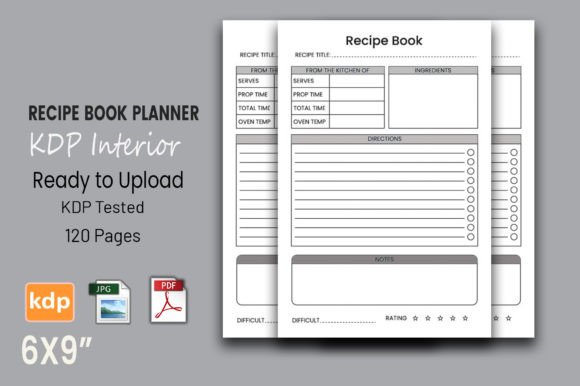
When you open the folder, you will immediately notice the thoughtful structure. The core of this offer is a 120-page PDF file ready for print. Each page is laid out with guided sections for recipe titles, ingredient lists, preparation steps, cooking times, and personal notes. The template does not force you to keep every field; you can adapt the space to fit your own vision, whether that means a minimalist design or a more structured cooking journal.
A standout characteristic is the vector-based PDF. Because the internal elements are vector, you can scale the artwork without any loss of sharpness. This matters if you ever want to adjust the book to a slightly different size. The file also remains fully editable in Adobe Illustrator, so if you own that software, you can tweak fonts, rearrange boxes, or add your own branding touches. Even if you do not use Illustrator, the print-ready PDF and high-resolution JPG files are there for instant upload or quick previews.
The package includes:
- A print-ready PDF with 120 interior pages
- Trim size set at 6x9 inches, a popular handheld format
- 300 DPI resolution, ensuring crisp text and line art
- No bleed settings, simplifying your KDP upload process
- Separate high-resolution JPG files for sharing or marketing
- Complete compatibility test on the Amazon KDP platform
Why This Interior Appeals to So Many Different People
On the surface, a recipe planner might seem niche. But the way people interact with food, memory-keeping, and organization cuts across many interests. A parent collecting handed-down family dishes wants a soft, forgiving space to write. A fitness coach building meal-prep guides needs clear sections for macros and portion sizes. A food blogger developing a branded product for readers appreciates a layout that feels both professional and personal. The Recipe Book Planner KDP Interior does not lock you into one flavor; it provides a framework that you can gently shape.
The appeal also lies in speed. Testing a book interior on KDP can take hours of trial and error with margins or DPI warnings. Knowing that the file has already passed those checks removes a layer of anxiety. For someone just starting a low-content publishing venture, that reassurance alone is valuable. You can go from purchase to listing in a very short time, which is particularly useful if you are building a catalog of related items like grocery lists, meal planners, or kitchen conversion charts.
Practical Ways Creators Put It to Use
There is no single “correct” way to use this interior. Many independent publishers grab the design, choose a beautiful cover, and publish a Recipe Book Planner KDP Interior as a standalone product that sells year-round. Others treat it as a foundation and build a series:
- A summer grilling journal with added prompts for outdoor cooking techniques.
- A holiday baking log where each page holds space for gift tags and family notes.
- A meal-prep organizer for fitness coaches, with subtle weekday checkboxes added in an editing program.
- A private family cookbook printed and spiral-bound for personal use, not for sale.
Because the file remains editable in Illustrator, you are not stuck with the original wording. You can swap out generic headings for custom ones, or leave certain sections intentionally blank to encourage creativity from the end user. The 6x9 trim size feels comfortable in one hand, similar to a typical novel or journal, which makes it practical for kitchen counter use—an important detail often overlooked.
Even without editing software, the PDF and JPG files hold their own. You can drop the print-ready interior directly into KDP, pair it with a cohesive cover, and list your item. This low-friction workflow is a big reason people exploring the low-content model find it approachable.
Qualities That Make the Design Stand Out
Take a closer look at the technical details and you will notice why this interior performs well. The 300 DPI resolution means linework, borders, and small icons print clearly. When you hold a finished copy, you won't see fuzzy edges or pixelated illustrations. The lack of bleed settings keeps the file simple. Bleed can be useful for full-color backgrounds, but for a black-and-white recipe journal, a no-bleed layout prevents trimming errors and makes the upload process smoother for beginners.
The vector nature deserves another mention because it opens doors beyond Amazon. You might want to use the interior to create a printable PDF for Etsy, a digital journal for apps like GoodNotes, or a coil-bound notebook for a local bookstore. Resizing to A5 or a square format becomes a quick, clean process without the need to redraw anything. The included JPG files serve as a fast reference, but they also work nicely for social media teasers or product mockups.
Things to Consider Before You Dive in
While the template is generous in what it offers, a few practical thoughts can save you time. Firstly, the editable vector feature truly shines if you have access to Adobe Illustrator or a compatible vector editor. If you plan to make extensive customizations—like redesigning headers or inserting your own illustrations—you will need that software. Many buyers are perfectly happy with the default layout, but it is worth knowing your options.
Secondly, think about the end user's experience. A recipe book planner often gets scribbled on, splashed, and handled with wet hands. The 6x9 format is portable, but the paper quality selected during publishing will affect durability. This is not a flaw in the interior itself, but a gentle prompting to choose a paper type that complements the book’s practical purpose. Amazon’s standard white paper works, but cream paper may feel more inviting for a kitchen journal.
Also consider that the interior is 120 pages. That length works well for a complete keepsake, but you might decide to shorten or expand it. Since the PDF is resizable and pages can be removed in a PDF editor, you have control. However, keep in mind that Amazon requires a minimum page count, so while you can trim it, you cannot go below their threshold without risking rejection.
Finally, while the product description emphasizes KDP testing, it’s smart to order a physical proof copy before going live. Press adjustments can subtly shift alignment, and checking a real book in your hands confirms what the digital preview cannot. This small habit protects your reviews and keeps your publishing business credible.
Blending Creativity with a Proven Framework
One of the quiet advantages of using a verified interior like this is the creative space it leaves. You stop worrying about inner margins, gutter settings, or whether the header text will get lost in the fold. Instead, you can focus on the cover design, the title, the description that sells the item, and the overall brand voice. That shift in energy often leads to better listings and more consistent quality across your catalog.
The Recipe Book Planner KDP Interior bridges the gap between a blank notebook and a fully guided workbook. It invites personal touches while guarding against the technical mistakes that can stall a publishing project. Whether you see it as a single product or the seed for an entire line of kitchen-themed log books, the value lies in its flexibility and the peace of mind from a tested base.
For hobbyists, it delivers a smooth path toward holding a real book you created. For entrepreneurs, it cuts down the time from idea to income. In either case, the download does the heavy formatting work so you can concentrate on making something useful, beautiful, and genuinely helpful to whoever opens the cover.
If you have been sitting on the fence about publishing your first low-content book, or you need a reliable interior to expand an existing series, this package offers a clear, well-tested starting point. The 120 pages, vector support, and KDP verification combine to give you a toolkit rather than a simple template—one that adapts as your ideas grow.